Manage DDEV with ease
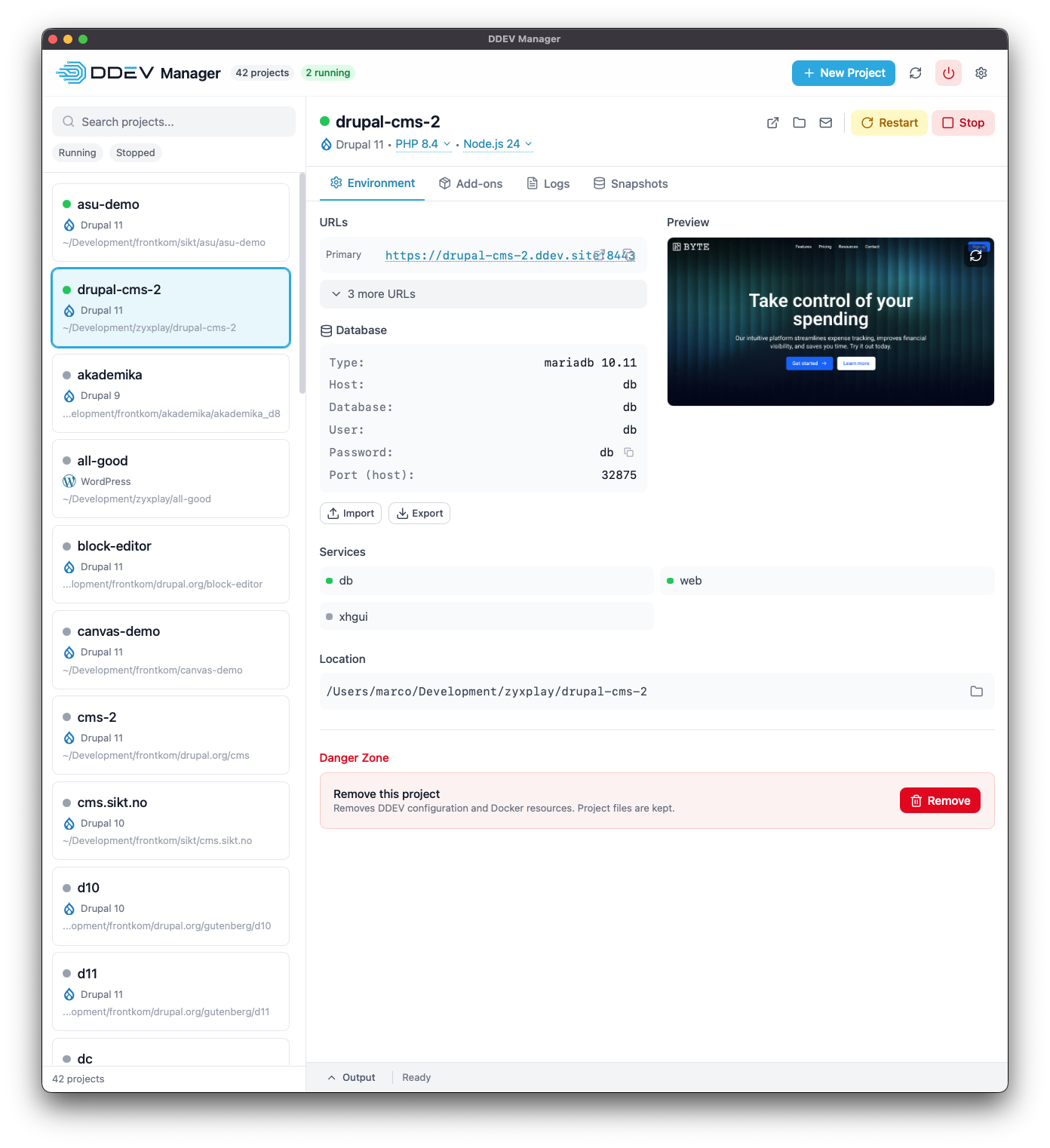
A beautiful desktop application for managing your DDEV local development environments. Start, stop, and configure projects with a single click.


Everything you need to manage DDEV
A powerful GUI that makes local development a breeze
Cross-Platform
Native support for macOS, Windows, and Linux. Runs beautifully on all platforms.
One-Click Control
Start, stop, and restart your DDEV projects instantly with a single click.
Database Tools
Create snapshots, import and export databases with an intuitive interface.
Add-on Management
Browse and install add-ons from the official DDEV registry.
CMS Installers
Quick-start Drupal, Laravel, WordPress, Shopware, and more with built-in installers.
Real-time Terminal
See command output as it happens with the integrated terminal view.
Download DDEV Manager
Latest version: v0.7.0
macOS
Universal binary for Intel and Apple Silicon
First launch: Right-click → Open to bypass Gatekeeper
Windows
Native Windows installer
Linux
Available as .deb and AppImage
For graphics issues: GDK_BACKEND=x11
DDEV Manager requires DDEV to be installed on your system.
Installation Notes
macOS Gatekeeper
The app is not signed with an Apple Developer certificate. On first launch:
- Right-click the app and select "Open"
- Click "Open" in the dialog
Or via terminal:
xattr -d com.apple.quarantine /Applications/DDEV\ Manager.app
Linux Graphics Issues
If you experience graphics issues with the AppImage, try forcing X11:
GDK_BACKEND=x11 ./DDEV.Manager_*.AppImage
What's New in v0.7.0
[0.7.0] - 2026-02-05
Bug Fixes
- Add closeOnClickOutside prop and fade-out animation to Modal
- Add bottom padding to tabs to prevent Terminal button overlap
- Align screenshot to top and auto-capture when missing
- Configure updater artifacts and regenerate signing key
- Combine job-level if conditions
- Add skip condition to all build steps
- Add Windows path detection and WSL support for DDEV
- Force X11 backend on Linux to avoid Wayland graphics issues
- Use WEBKIT_DISABLE_COMPOSITING_MODE instead of forcing X11
- Skip AppImage for Linux ARM64 build (only .deb)
- Use native ARM64 runner for Linux ARM64 builds
- Only restart project when changing versions if it was running (#12)
- Improve modal backdrop for Linux compatibility (#14)
- Prevent URL text from overlapping action buttons (#31)
- Re-open auto-closed issues and add pending-release label (#33)
- Cross-compile linux-arm64 from x86_64 runner (#39)
Documentation
- Update README with universal macOS package and Gatekeeper info
- Add auto-updater documentation
- Update README with database management features
- Add screenshots to README
- Update documentation for modular Rust backend structure
- Update project structure to show modular Rust backend
- Update release link in README
- Add Linux Wayland/graphics troubleshooting to README
- Add CLAUDE.md with project instructions and git workflow (#7)
- Update screenshots (#17)
- Add pull request template (#21)
- Add issue templates for bugs and features (#22)
- Add security policy (#23)
- Add note about not including AI attribution in commits
- Add release workflow instructions (#29)
Features
- Add automatic changelog generation to releases
- Add glassmorphism UI effects and reusable Modal component
- Add project screenshot capture and preview
- Add animated progress bar to status bar
- Add auto-update functionality
- Improve auto-updater and simplify local builds
- Add Snapshots tab for database snapshot management
- Add database import/export and fix snapshot restore
- Update branding with DDEV logo and cyan primary color
- Add support for generic DDEV projects
- Add persistent status bar with output toggle
- Improve header badges and status filter behavior
- Add ARM64 builds for Windows and Linux
- Add manual workflow dispatch for testing builds
- Make URLs clickable in EnvironmentTab (#6)
- Improve tooltip on project status indicator
- Sort projects by status first (running on top), then by name
- Add PHP and Node.js version selectors with DDEV schema caching
- Add project type icons for CMS/framework branding (#13)
- Add comprehensive accessibility improvements (#19)
- Add database import/export options (#24)
- Add keyboard shortcuts for zoom (#26)
- Add high contrast dark theme for accessibility (#27)
- Add custom tooltip component with accessibility improvements (#28)
- Add issue management workflow for release-based closing (#32)
- Add workflow to trigger website rebuild on release (#34)
- Add xdebug and xhgui toggle controls (#36)
Miscellaneous
- Change height units
- Release v0.2.0
- Release v0.3.0
- Release v0.3.1
- Release v0.3.1
- Remove debug logs
- Release v0.3.2
- Release v0.4.0
- Release v0.4.1
- Release v0.5.0
- Release v0.5.1
- Bump version to 0.6.0
- Update website repo reference after rename
- Bump version to 0.7.0 (#37)
Refactoring
- Remove experimental AI chat feature
- Add reusable UI components (Button, Dropdown, SearchInput, Badge)
- Add reusable Tabs component and refactor existing tabs
- Reorganize Environment tab layout with Accordion component
- Split lib.rs into organized modules
Styling
- Fix ASCII diagram spacing in README
Testing
- Improve test coverage for components, hooks, and stores
Ci
- Skip Rust build when only frontend files changed
Download
| Platform | Architecture | Download |
|---|---|---|
| macOS | Universal (Intel + Apple Silicon) | .dmg |
| Windows | x64 | .msi or .exe |
| Windows | ARM64 | .exe |
| Linux | x64 | .deb or .AppImage |
| Linux | ARM64 | .deb |
macOS users: Run xattr -cr "/Applications/DDEV Manager.app" if blocked by Gatekeeper.
Built by the Community
Thanks to all the contributors who help make DDEV Manager better


DDEV Manager is built on top of DDEV , the open-source local development environment for PHP, Python, and Node.js.
Learn more about DDEV